mirror of
https://github.com/memohai/Memoh.git
synced 2026-04-27 07:16:19 +09:00
 Acbox
Acbox
91 lines
4.1 KiB
Markdown
91 lines
4.1 KiB
Markdown
<div align="right">
|
||
<span>[<a href="./README.md">English</a>]<span>
|
||
</span>[<a href="./README_CN.md">简体中文</a>]</span>
|
||
</div>
|
||
|
||
<div align="center">
|
||
<img src="./assets/logo.png" alt="Memoh" width="100" height="100">
|
||
<h1>Memoh</h1>
|
||
<p>多用户、结构化记忆、容器化的 AI Agent 系统。</p>
|
||
<p>📌 <a href="https://docs.memoh.ai/blogs/2026-02-16.html">Introduction to Memoh - The Case for an Always-On, Containerized Home Agent</a></p>
|
||
<div align="center">
|
||
<img src="https://img.shields.io/github/package-json/v/memohai/Memoh" alt="Version" />
|
||
<img src="https://img.shields.io/github/license/memohai/Memoh" alt="License" />
|
||
<img src="https://img.shields.io/github/stars/memohai/Memoh?style=social" alt="Stars" />
|
||
<img src="https://img.shields.io/github/forks/memohai/Memoh?style=social" alt="Forks" />
|
||
<img src="https://img.shields.io/github/last-commit/memohai/Memoh" alt="Last Commit" />
|
||
<img src="https://img.shields.io/github/issues/memohai/Memoh" alt="Issues" />
|
||
</div>
|
||
<div align="center">
|
||
[<a href="https://t.me/memohai">Telegram 群组</a>]
|
||
[<a href="https://docs.memoh.ai">文档</a>]
|
||
[<a href="mailto:business@memoh.net">合作</a>]
|
||
</div>
|
||
<hr>
|
||
</div>
|
||
|
||
Memoh 是一个 AI Agent 系统平台。用户可通过 Telegram、Discord、飞书(Lark) 等创建自己的 AI 机器人并与之对话。每个 bot 拥有独立的容器与记忆系统,可编辑文件、执行命令并自我构建——与 [OpenClaw](https://openclaw.ai) 类似,Memoh 为多 bot 管理提供更安全、灵活、可扩展的解决方案。
|
||
|
||
## 快速开始
|
||
|
||
一键安装(**需先安装 [Docker](https://www.docker.com/get-started/)**):
|
||
|
||
```bash
|
||
curl -fsSL https://raw.githubusercontent.com/memohai/Memoh/main/scripts/install.sh | sh
|
||
```
|
||
|
||
*静默安装(全部默认):`curl -fsSL ... | sh -s -- -y`*
|
||
|
||
或手动部署:
|
||
|
||
```bash
|
||
git clone --depth 1 https://github.com/memohai/Memoh.git
|
||
cd Memoh
|
||
docker compose up -d
|
||
```
|
||
|
||
启动后访问 <http://localhost:8082>。默认登录:`admin` / `admin123`
|
||
|
||
自定义配置与生产部署请参阅 [DEPLOYMENT.md](DEPLOYMENT.md)。
|
||
|
||
## 为什么选择 Memoh?
|
||
|
||
OpenClaw、Clawdbot、Moltbot 固然出色,但在稳定性、安全性、配置复杂度与 token 成本上仍有不足。若你正在寻找稳定、安全的 Bot SaaS 方案,不妨考虑我们的开源 Memoh。
|
||
|
||
Memoh 是基于 Golang 的多 bot agent 服务,提供 bot、Channel、MCP、Skills 等的完整图形化配置。我们使用 Containerd 为每个 bot 提供容器级隔离,并大量借鉴 OpenClaw 的 Agent 设计。
|
||
|
||
Memoh Bot 具备深度工程化的记忆层,灵感来自 Mem0:对每轮对话进行知识存储,实现更精准的记忆检索。
|
||
|
||
Memoh Bot 能区分并记忆多人与多 bot 的请求,在任意群聊中无缝协作。你可以用 Memoh 组建 bot 团队,或为家人配置账号,用 bot 管理日常家务。
|
||
|
||
## 特性
|
||
- **多 Bot 管理**:创建多个 bot;人与 bot、bot 与 bot 可私聊、群聊或协作。
|
||
- **容器化**:每个 bot 运行在独立容器中,可在容器内自由执行命令、编辑文件、访问网络,宛如各自拥有一台电脑。
|
||
- **记忆工程**:每次对话存入数据库,默认加载最近 24 小时上下文;每轮对话会存储为记忆,供 bot 通过语义检索召回。
|
||
- **多平台**:支持 Telegram、飞书(Lark) 等。
|
||
- **简单易用**:通过图形界面配置 Provider、Model、Memory、Channel、MCP、Skills 等,无需编码即可搭建自己的 AI 机器人。
|
||
- **定时任务**:使用 cron 表达式在指定时间执行命令。
|
||
- 更多…
|
||
|
||
## 路线图
|
||
|
||
详见 [Roadmap Version 0.1](https://github.com/memohai/Memoh/issues/2)。
|
||
|
||
### 开发
|
||
|
||
开发环境配置请参阅 [CONTRIBUTING.md](CONTRIBUTING.md)。
|
||
|
||
## Star History
|
||
|
||
[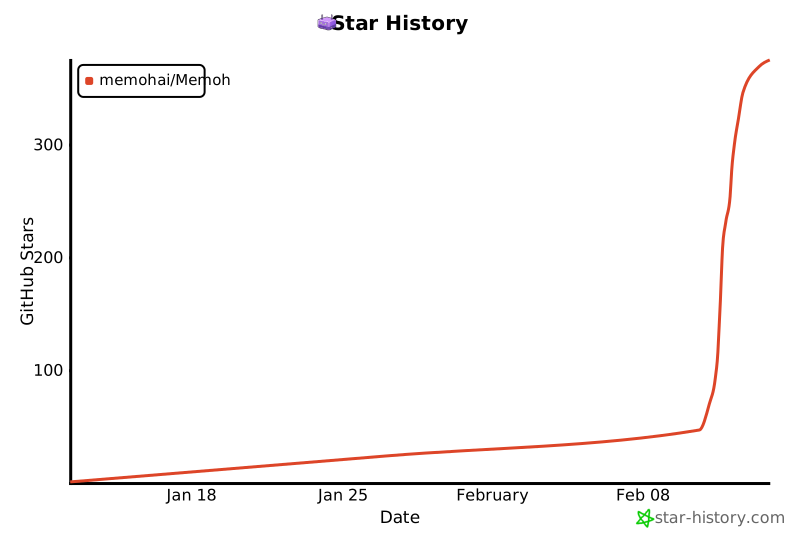](https://www.star-history.com/#memohai/Memoh&type=date&legend=top-left)
|
||
|
||
## Contributors
|
||
|
||
<a href="https://github.com/memohai/Memoh/graphs/contributors">
|
||
<img src="https://contrib.rocks/image?repo=memohai/Memoh" />
|
||
</a>
|
||
|
||
**LICENSE**: AGPLv3
|
||
|
||
Copyright (C) 2026 Memoh. All rights reserved.
|