mirror of
https://github.com/memohai/Memoh.git
synced 2026-04-27 07:16:19 +09:00
 BBQ
bc374fe8cd
BBQ
bc374fe8cd
* refactor(attachment): multimodal attachment refactor with snapshot schema and storage layer

- Add snapshot schema migration (0008) and update init/versions/snapshots
- Add internal/attachment and internal/channel normalize for unified attachment handling
- Move containerfs provider from internal/media to internal/storage
- Update agent types, channel adapters (Telegram/Feishu), inbound and handlers
- Add containerd snapshot lineage and local_channel tests
- Regenerate sqlc, swagger and SDK

* refactor(media): content-addressed asset system with unified naming

- Replace asset_id foreign key with content_hash as sole identifier
  for bot_history_message_assets (pure soft-link model)
- Remove mime, size_bytes, storage_key from DB; derive at read time
  via media.Resolve from actual storage
- Merge migrations 0008/0009 into single 0008; keep 0001 as canonical schema
- Add Docker initdb script for deterministic migration execution order
- Fix cross-channel real-time image display (Telegram → WebUI SSE)
- Fix message disappearing on refresh (null assets fallback)
- Fix file icon instead of image preview (mime derivation from storage)
- Unify AssetID → ContentHash naming across Go, Agent, and Frontend
- Change storage key prefix from 4-char to 2-char for directory sharding
- Add server-entrypoint.sh for Docker deployment migration handling

* refactor(infra): embedded migrations, Docker simplification, and config consolidation

- Embed SQL migrations into Go binary, removing shell-based migration scripts
- Consolidate config files into conf/ directory (app.example.toml, app.docker.toml, app.dev.toml)
- Simplify Docker setup: remove initdb.d scripts, streamline nginx config and entrypoint
- Remove legacy CLI, feishu-echo commands, and obsolete incremental migration files
- Update install script and docs to require sudo for one-click install
- Add mise tasks for dev environment orchestration

* chore: recover migrations

---------

Co-authored-by: Acbox <acbox0328@gmail.com>
95 lines
4.6 KiB
Markdown
95 lines
4.6 KiB
Markdown
<div align="right">
|
|
<span>[<a href="./README.md">English</a>]<span>
|
|
</span>[<a href="./README_CN.md">简体中文</a>]</span>
|
|
</div>
|
|
|
|
<div align="center">
|
|
<img src="./assets/logo.png" alt="Memoh" width="100" height="100">
|
|
<h1>Memoh</h1>
|
|
<p>Multi-Member, Structured Long-Memory, Containerized AI Agent System.</p>
|
|
<p>📌 <a href="https://docs.memoh.ai/blogs/2026-02-16.html">Introduction to Memoh - The Case for an Always-On, Containerized Home Agent</a></p>
|
|
<div align="center">
|
|
<img src="https://img.shields.io/github/package-json/v/memohai/Memoh" alt="Version" />
|
|
<img src="https://img.shields.io/github/license/memohai/Memoh" alt="License" />
|
|
<img src="https://img.shields.io/github/stars/memohai/Memoh?style=social" alt="Stars" />
|
|
<img src="https://img.shields.io/github/forks/memohai/Memoh?style=social" alt="Forks" />
|
|
<img src="https://img.shields.io/github/last-commit/memohai/Memoh" alt="Last Commit" />
|
|
<img src="https://img.shields.io/github/issues/memohai/Memoh" alt="Issues" />
|
|
</div>
|
|
<div align="center">
|
|
[<a href="https://t.me/memohai">Telegram Group</a>]
|
|
[<a href="https://docs.memoh.ai">Documentation</a>]
|
|
[<a href="mailto:business@memoh.net">Cooperation</a>]
|
|
</div>
|
|
<hr>
|
|
</div>
|
|
|
|
|
|
|
|
Memoh is a AI agent system platform. Users can create their own AI bots and chat with them via Telegram, Discord, Lark(Feishu), etc. Every bot has independent container and memory system which allows them to edit files, execute commands and build themselves - Like [OpenClaw](https://openclaw.ai), Memoh provides a more secure, flexible and scalable solution for multi-bot management.
|
|
|
|
## Quick Start
|
|
|
|
One-click install (**requires [Docker](https://www.docker.com/get-started/)**):
|
|
|
|
```bash
|
|
curl -fsSL https://raw.githubusercontent.com/memohai/Memoh/main/scripts/install.sh | sudo sh
|
|
```
|
|
|
|
*Silent install with all defaults: `curl -fsSL ... | sudo sh -s -- -y`*
|
|
|
|
Or manually:
|
|
|
|
```bash
|
|
git clone --depth 1 https://github.com/memohai/Memoh.git
|
|
cd Memoh
|
|
sudo docker compose up -d
|
|
```
|
|
|
|
> On macOS or if your user is in the `docker` group, `sudo` is not required.
|
|
|
|
Visit <http://localhost:8082> after startup. Default login: `admin` / `admin123`
|
|
|
|
See [DEPLOYMENT.md](DEPLOYMENT.md) for custom configuration and production setup.
|
|
|
|
## Why Memoh?
|
|
|
|
OpenClaw, Clawdbot, and Moltbot are impressive, but they have notable drawbacks: stability issues, security concerns, cumbersome configuration, and high token costs. If you're looking for a stable, secure Bot SaaS solution, consider our open-source Memoh.
|
|
|
|
Memoh is a multi-bot agent service built with Golang. It offers full graphical configuration for bots, Channels, MCP, and Skills. We use Containerd to provide container-level isolation for each bot and draw heavily from OpenClaw's Agent design.
|
|
|
|
Memoh Bot features a deeply engineered memory layer inspired by Mem0. By storing knowledge from each conversation turn, it enables more precise memory retrieval.
|
|
|
|
Memoh Bot can distinguish and remember requests from multiple humans and bots, working seamlessly in any group chat. You can use Memoh to build bot teams, or set up accounts for family members to manage daily household tasks with bots.
|
|
|
|
## Features
|
|
- **Multi-bot Management**: Create multiple bots; humans and bots, or bots with each other, can chat privately, in groups, or collaborate.
|
|
- **Containerized**: Each bot runs in its own isolated container. Bots can freely execute commands, edit files, and access the network within their containers—like having their own computer.
|
|
- **Memory Engineering**: Every chat is stored in the database, with the last 24 hours of context loaded by default. Each conversation turn is stored as memory and can be retrieved by bots through semantic search.
|
|
- **Various Platforms**: Supports Telegram, Lark (Feishu), and more.
|
|
- **Simple and Easy to Use**: Configure bots and settings for Provider, Model, Memory, Channel, MCP, and Skills through a graphical interface—no coding required to set up your own AI bot.
|
|
- **Scheduled Tasks**: Schedule tasks with cron expressions to run commands at specified times.
|
|
- More...
|
|
|
|
## Roadmap
|
|
|
|
Please refer to the [Roadmap Version 0.1](https://github.com/memohai/Memoh/issues/2) for more details.
|
|
|
|
### Development
|
|
|
|
Refer to [CONTRIBUTING.md](CONTRIBUTING.md) for development setup.
|
|
|
|
## Star History
|
|
|
|
[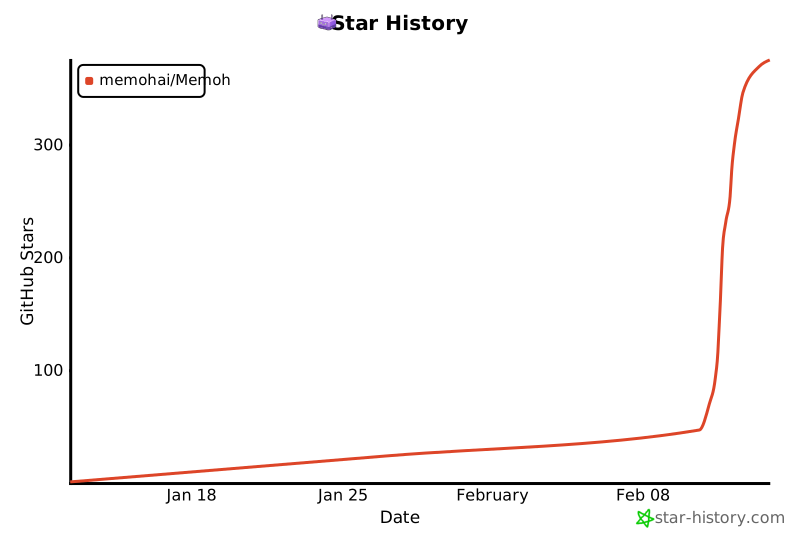](https://www.star-history.com/#memohai/Memoh&type=date&legend=top-left)
|
|
|
|
## Contributors
|
|
|
|
<a href="https://github.com/memohai/Memoh/graphs/contributors">
|
|
<img src="https://contrib.rocks/image?repo=memohai/Memoh" />
|
|
</a>
|
|
|
|
**LICENSE**: AGPLv3
|
|
|
|
Copyright (C) 2026 Memoh. All rights reserved.
|