mirror of
https://github.com/memohai/Memoh.git
synced 2026-04-25 07:00:48 +09:00
 zenhouke
d45487433c
zenhouke
d45487433c
- Add Docker Compose configuration for one-click deployment
- Add Dockerfiles for server, agent, and web services
- Add deployment script (deploy.sh) with automatic setup
- Add comprehensive deployment documentation (DEPLOYMENT.md)
- Use host Docker socket instead of DinD for better performance
- Add Nginx configuration for web frontend
- Add Makefile for common operations
- Update README with Docker deployment quick start

Features:
- One-command deployment with ./deploy.sh
- Automatic JWT secret generation
- Health checks for all services
- Data persistence with Docker volumes
- Support for Bot container management via host Docker
- Production-ready configuration examples

Co-authored-by: root <root@DESKTOP-OU6H3GS.localdomain>
87 lines
3.9 KiB
Markdown
87 lines
3.9 KiB
Markdown
<div align="right">
|
||
<span>[<a href="./README.md">English</a>]<span>
|
||
</span>[<a href="./README_CN.md">简体中文</a>]</span>
|
||
</div>
|
||
|
||
<div align="center">
|
||
<img src="./assets/logo.png" alt="Memoh" width="100" height="100">
|
||
<h1>Memoh</h1>
|
||
<p>多用户,结构化记忆,容器化的AI Agent系统</p>
|
||
<div align="center">
|
||
<img src="https://img.shields.io/github/package-json/v/memohai/Memoh" alt="Version" />
|
||
<img src="https://img.shields.io/github/license/memohai/Memoh" alt="License" />
|
||
<img src="https://img.shields.io/github/stars/memohai/Memoh?style=social" alt="Stars" />
|
||
<img src="https://img.shields.io/github/forks/memohai/Memoh?style=social" alt="Forks" />
|
||
<img src="https://img.shields.io/github/last-commit/memohai/Memoh" alt="Last Commit" />
|
||
<img src="https://img.shields.io/github/issues/memohai/Memoh" alt="Issues" />
|
||
</div>
|
||
<hr>
|
||
</div>
|
||
|
||
Memoh 是一个 AI Agent 系统平台。用户可以通过 Telegram、Discord、飞书(Lark) 等渠道创建自己的 AI 机器人并与之对话。每个 bot 都有独立的容器和记忆系统,可编辑文件、执行命令并自我构建——与 [OpenClaw](https://openclaw.ai) 类似,Memoh 为多 bot 管理提供了更安全、灵活和可扩展的解决方案。
|
||
|
||
## 为什么选择 Memoh?
|
||
|
||
OpenClaw、Clawdbot、Moltbot 固然酷炫,但存在诸多不足:稳定性欠佳、安全性争议、配置繁琐、以及高额 token 消耗。如果你正在寻找一款稳定、安全的 Bot SaaS 方案,不妨关注我们的开源产品——Memoh。
|
||
|
||
Memoh 是一款支持多 bot 的 agent 服务,采用 Golang 编写,可完全通过图形化界面配置 bot 以及 Channel、MCP、Skills 等设置。我们使用 Containerd 为每个 bot 提供容器级隔离,并大量借鉴了 OpenClaw 的 Agent 设计思路。
|
||
|
||
Memoh Bot 在记忆层进行了深度工程化,借鉴 Mem0 的设计理念,通过对每轮对话进行知识存储,实现更精准的记忆召回。
|
||
|
||
Memoh Bot 能够区分并记忆来自多个人类/Bot 的请求,可在任意群聊中工作。你可以用 Memoh 组建 bot 团队,或为家人准备 Memoh 账号,让 bot 管理日常家庭事务。
|
||
|
||
## 特性
|
||
- **多 Bot 管理**:可创建多个 bot,人类与 bot、bot 与 bot 之间可互相私聊、群聊或协作
|
||
- **容器化**:每个 bot 运行在独立隔离的容器中,可在容器内自由执行命令、编辑文件、访问网络,宛如拥有自己的电脑
|
||
- **记忆工程**:每次聊天都会存入数据库,默认加载最近 24 小时的上下文;每轮对话的内容会被存储为记忆,可通过语义检索被 bot 召回
|
||
- **多平台支持**:支持 Telegram、飞书(Lark) 等平台
|
||
- **简单易用**:通过图形化界面配置 bot 及 Provider、Model、Memory、Channel、MCP、Skills 等设置,无需编写代码即可快速搭建自己的 AI 机器人
|
||
- **定时任务**:支持使用 cron 表达式定时执行命令
|
||
- 更多...
|
||
|
||
## 路线图
|
||
|
||
详情请参阅 [Roadmap Version 0.1](https://github.com/memohai/Memoh/issues/2)。
|
||
|
||
## 快速开始
|
||
|
||
### Docker 部署(推荐)
|
||
|
||
最快的部署方式:
|
||
|
||
```bash
|
||
git clone https://github.com/memohai/Memoh.git
|
||
cd Memoh
|
||
./deploy.sh
|
||
```
|
||
|
||
部署完成后访问 http://localhost。详见 [Docker 部署指南](README_DOCKER.md)。
|
||
|
||
### 开发环境
|
||
|
||
详见 [CONTRIBUTING.md](CONTRIBUTING.md)。
|
||
|
||
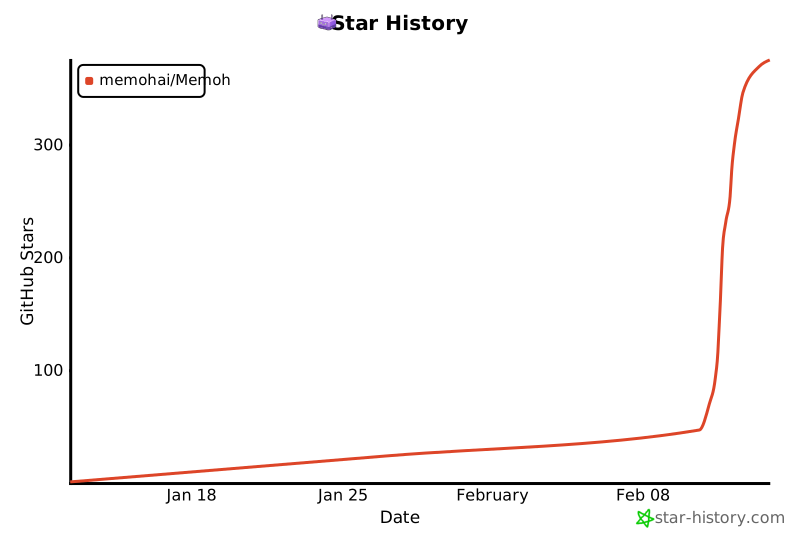
## Star History
|
||
|
||
[](https://www.star-history.com/#memohai/Memoh&type=date&legend=top-left)
|
||
|
||
## Contributors
|
||
|
||
<a href="https://github.com/memohai/Memoh/graphs/contributors">
|
||
<img src="https://contrib.rocks/image?repo=memohai/Memoh" />
|
||
</a>
|
||
|
||
## 联系我们
|
||
|
||
商务合作: [business@memoh.net](mailto:business@memoh.net)
|
||
|
||
- Telegram Group: [MEMOHAI](https://t.me/memohai)
|
||
<br>
|
||
<a href="https://t.me/memohai">
|
||
<img width="200" src="./assets/telegram.jpg" >
|
||
</a>
|
||
---
|
||
|
||
**LICENSE**: AGPLv3
|
||
|
||
Copyright (C) 2026 Memoh. All rights reserved. |